Write and Edit Documents
Use Redbelt’s Markdown editor for working notes, plans, and other text documents. Opening a preview and opening an editable document are different views.
Structure Makes a Document Easier to Use
Section titled “Structure Makes a Document Easier to Use”Use headings for Decisions, Action Items, and Open Questions so a teammate can find the part they need. Use a table for owners and deadlines that must be compared across rows. A concise structure also makes it easier to ask the agent for a focused change.
For AI-assisted editing, state what must stay intact: “Shorten the introduction, keeping the existing deadline and assigned owner.” Review the proposed text before accepting it. Formatting, saving, and factual review are separate checks; a saved document can still contain an incorrect date.
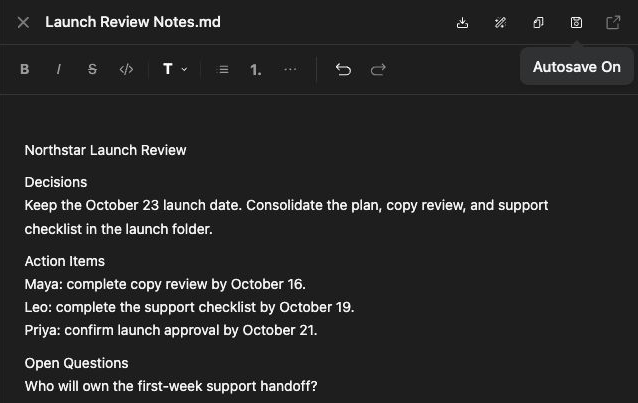
Open a document
Section titled “Open a document”- Find the Markdown document in Knowledge or open a document produced by a run.
- Use Open or the offered document view to reach the editor.
- Confirm the file name and that you have edit access.
- Edit the text and use the toolbar for headings, lists, links, quotes, or tables.
- Check the save state before leaving the document.
For a launch review, use headings for Decisions, Action Items, and Open Questions. Use a table when owners and deadlines need to be compared.
Review AI-assisted edits
Section titled “Review AI-assisted edits”The editor can offer writing controls or alternatives for selected text. Review the proposed wording before accepting it, especially factual names, dates, and amounts. Ask for a focused edit such as “Make this paragraph shorter while keeping the three deadlines unchanged.”
Check persistence
Section titled “Check persistence”Reopen the document and confirm the saved content. An unsaved temporary document can require a destination before it becomes a Knowledge file. If a save fails, keep the editor open, preserve your text, and resolve the error before navigating away. Read-only documents need an editable copy or changed access.
Word, PowerPoint, and PDF files use their supported document/artifact paths; the Markdown editor does not turn every format into an editable native document.
Related: Knowledge organization and copy and download answers.