Organize Files and Folders
Keep related documents in a named folder so people and agents can find the same working set. For a project, group its plan, review notes, and reference material in a folder named for that project.
Organize for Reuse
Section titled “Organize for Reuse”A folder gives a project a consistent home. Put its plan and review notes together so you can select the folder for a broad review or one file for a focused question.
Renaming makes a resource easier to recognize; moving changes where you find it. Neither should be treated as a way to rewrite its content. For connector-managed content, the connector’s source choices control what comes in. Review sharing after a move so the intended reviewers can still use the resulting location.
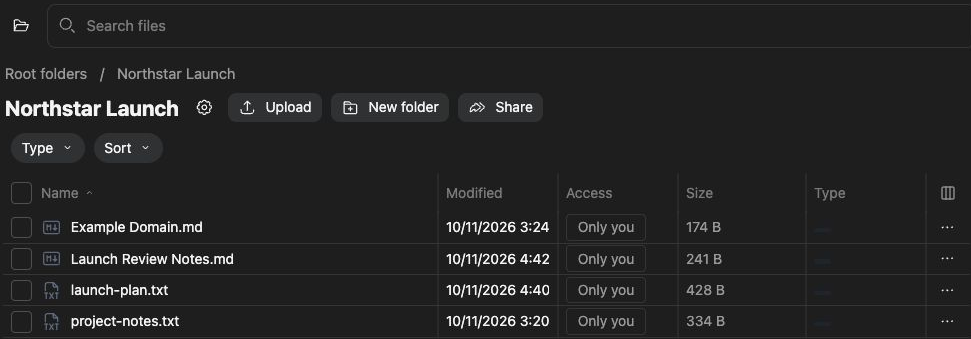
Create and name a folder
Section titled “Create and name a folder”- Open Knowledge and the intended parent folder or root.
- Choose New folder or the folder-add control.
- Enter a descriptive name and complete creation.
- Open the folder and confirm its location and access.
To rename an editable folder, use its heading’s rename control or folder menu. Reopen the folder afterward to confirm the new name.
Organize files
Section titled “Organize files”Open a file’s actions menu for Rename, Move, Preview, Open, Download, or Info, depending on the resource. For a move, select the destination folder and check the file there afterward. Preview opens a view of the content; it does not necessarily open an editable document.
Connected folders can be managed by their connector. Use the connection’s configuration to change its source scope rather than treating imported folders as independent uploads.
Check access and mistakes
Section titled “Check access and mistakes”Review sharing after reorganizing content, especially when moving between private and shared folders. If a rename or move control is unavailable, check edit permission and connector ownership. Read deletion confirmations before removing files; organization does not require deleting the originals.
Related: sharing, search, and upload content.