Export Your Data
Use the bulk exporter to download selected threads. The Data & export page also contains destructive cleanup controls; exporting does not require clearing your history.
Decide What the Export Is For
Section titled “Decide What the Export Is For”Choose an export’s scope and detail for its destination. A readable record may need just messages; a diagnostic review may need the offered tool details as well. Those details can contain resource names and other context that you would not include in a public summary.
Inspect a small export before exporting everything. Confirm that it includes the intended threads and that its files open correctly. Exporting makes a copy for use elsewhere; it does not by itself delete history or transfer access to the original linked resources.
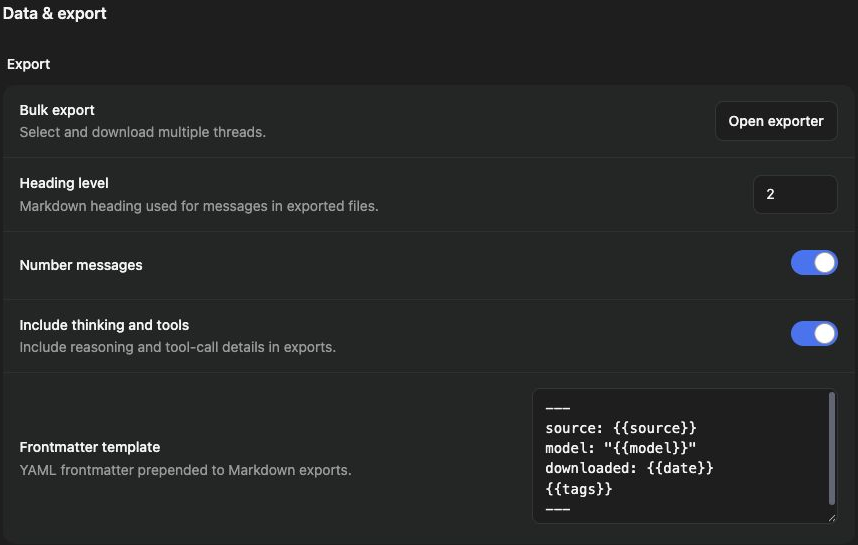
Configure the export
Section titled “Configure the export”- Open Settings → Data & export.
- Review Heading level, Number messages, and Frontmatter template.
- Choose whether Include thinking and tools is appropriate for the destination.
- Click Open exporter under Bulk export.
- Select the intended threads and complete the offered download.
- Open the downloaded output and check its contents.
For a launch archive, select the launch-review threads rather than every thread. Inspect the resulting Markdown headings and any included tool details before sharing the export outside your team.
Check completeness
Section titled “Check completeness”Verify that the selected threads and messages are present. Generated artifacts, linked external documents, and all workspace data are not necessarily bundled into a thread export. Download needed files through their own controls.
Avoid accidental deletion
Section titled “Avoid accidental deletion”Clear thread history and Clear tags are separate, permanent cleanup actions. Read their confirmations and preserve any needed export first. If a download is missing, check browser download handling and the exporter’s result; do not repeat a destructive cleanup to fix an export.
Related: copy and download answers and archives.