Choose or Create a Workspace
A workspace keeps an organization’s members, shared resources, permissions, and usage together. Switch workspaces before working on a different organization’s information.
Why the Workspace Matters
Section titled “Why the Workspace Matters”Think of the workspace as the boundary around the work: its members, shared resources, providers, and budget. Switching to another workspace changes the context you are working in; it does not duplicate your private files or move existing threads.
Choose the workspace before selecting sources or configuring automatic work. A familiar file name in another workspace can refer to a different document. Check the workspace again before inviting colleagues or changing billing, because those actions apply to the selected workspace.
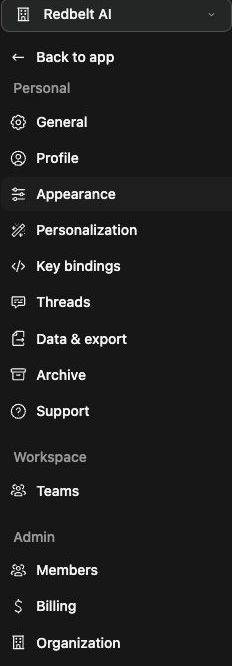
Choose an existing workspace
Section titled “Choose an existing workspace”- Open Settings.
- Click the workspace name at the top of the settings navigation.
- Choose an entry under Your workspaces.
- Check the displayed name after the switch, then return to the app.
Your individual account can appear as your first name followed by “individual account.” Switching the workspace does not move files or threads into it.
Create a workspace
Section titled “Create a workspace”If the menu offers Create workspace, open it and follow the setup form. Choose a name that identifies your team or organization. Review the plan, membership capacity, and any checkout before completing creation. Hosted and customer-hosted deployments can offer different setup paths.
Inviting teammates from an individual account can start organization creation. For an existing organization, Invite people or Request invitation depends on your permissions. Creating a workspace and inviting a member are separate outcomes.
Check the result
Section titled “Check the result”The new workspace should appear in the workspace menu. Reopen its settings and confirm the name and membership before adding shared content. If creation is unavailable, check deployment policy with an administrator; a missing menu item does not mean your existing account has been deleted.
Related: members and teams and billing.