Use Files and Knowledge in a Thread
Add Knowledge context when an answer should be based on your files. Selecting a file supplies context; your message supplies the task.
Why Selecting a Source Helps
Section titled “Why Selecting a Source Helps”The agent does not know which of your documents you mean just because they exist in Knowledge. Selecting the source narrows the work to the material you want considered. That is especially useful when several launch plans have similar names or different dates.
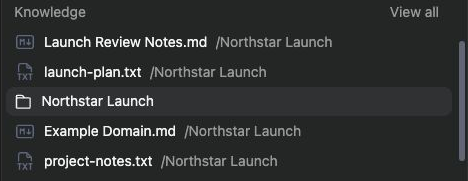
Choose a single file for a focused extraction or a folder for a comparison across documents. Keep the request explicit: ask for owners and dates, not just “look at this.” Selected resource chips show what you attached; citations and tool activity help you check what supported the finished answer.

Before you start
Section titled “Before you start”Upload and open the source file to confirm processing has finished. You need access to every selected resource. A connector being connected does not prove that its files have already arrived in Knowledge.
Add context
Section titled “Add context”-
Open the thread composer’s context picker.
-
Choose the Knowledge files or folders relevant to the request.
-
Check the selected resource badges and remove unrelated context.
-
Enter a specific request, such as:
Use the file I selected to list each owner, deadline, and remaining project action.
-
Send the message and inspect the answer’s citations or tool activity.
A folder is useful for work across several documents; a single file is useful when you want a focused answer. An agent can also have saved Knowledge context. Check that configuration if the answer uses unexpected sources.
Check the result
Section titled “Check the result”Open the cited files and compare important names, dates, and amounts with the source. If the agent cannot find the content, confirm the file is readable, selected in the intended workspace, and accessible to the agent’s run. An uploaded image or scanned document can depend on processing providers.
Related: add content to Knowledge, follow citations, and configure an agent.