Schedule Recurring Work and Notifications
An automation combines saved work with triggers. Use it for a recurring launch review or a reaction to new content, then inspect its actual runs.
Separate Work, Trigger, and Notification
Section titled “Separate Work, Trigger, and Notification”The saved instructions define the work. The trigger starts it on a schedule or event. The notification destination determines where an update should go. A Friday review can run correctly yet fail to deliver an external notification, so check the run and delivery separately.
A schedule does not remove the need for valid source access, app authorization, or action review. Test one bounded manual run first, then enable the relevant trigger. To stop future starts, disable that trigger; inspect any active run on its own.
Configure the work
Section titled “Configure the work”- Open the automation configuration offered by the workflow or task.
- Review the agent’s instructions, model, Knowledge, and required plugins.
- Run a small manual check and inspect its output.
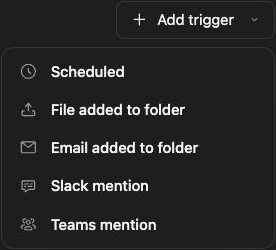
- Use Add trigger to choose an offered schedule or event type.
- Configure the cadence, time zone, or watched scope.
- Resolve Needs setup, wait for Saved, and enable the intended trigger.
For a weekly project update, select the project folder you want reviewed and ask the agent to list overdue actions every Friday at 10:00 a.m. Specify the time zone and notification destination rather than relying on “every morning.”
Review notifications and approvals
Section titled “Review notifications and approvals”Different destinations can require connected accounts or organization-managed senders. Inspect the exact recipient and content before enabling unattended external writes. A schedule does not remove action-review or permission checks.
Pause and verify
Section titled “Pause and verify”Turn off the relevant trigger to prevent future starts. Inspect any currently active run separately. After a scheduled time or event, open the run results and confirm the expected output and destination.
If nothing happens, check trigger activation, time zone, account health, and usage. If work repeats unexpectedly, disable the trigger while reviewing scope and duplicate configurations.
Related: workflow triggers, tasks, and notifications.