Choose a Model and Use Auto
Auto helps you get an appropriate model without choosing one for every task. It considers how much work a good answer needs and the models your workspace makes available. You can focus on the request instead of wondering whether you selected enough—or too much—AI capability.
What Auto Does
Section titled “What Auto Does”When automatic routing is configured, Redbelt assesses the request and its thread context, then selects from the workspace’s configured model tiers:
| Work involved | Example | Typical choice |
|---|---|---|
| Light | “Shorten this update to two sentences.” | A fast, efficient model. |
| Substantive | “Turn the launch notes into an owner-and-deadline checklist.” | A model suited to ordinary writing, research, or analysis. |
| Demanding | “Compare three launch strategies, their dependencies, and the risks if deadlines slip.” | A stronger model for more involved reasoning. |
This is about the work required, not just message length. A short question can still require careful reasoning. Auto also checks the capabilities needed for the request and the models your account can use.
Using an efficient model for lighter work can reduce token costs compared with using the largest model for every request. That does not mean every answer uses fewer tokens or that Auto always picks the cheapest model. Prices, task size, available models, and workspace limits still affect cost.
An agent and a model have different jobs: an agent provides instructions, Knowledge, and plugins; the model is the AI engine doing the work. Auto chooses the model without replacing the agent’s saved instructions or resources.
Choose Auto or a Specific Model
Section titled “Choose Auto or a Specific Model”- Open a new or existing thread.
- Click the model button beside the composer.
- Choose Auto to let Redbelt select, or choose an available model when you need a particular model’s behavior or capabilities.
- Enter your request and click Send message.
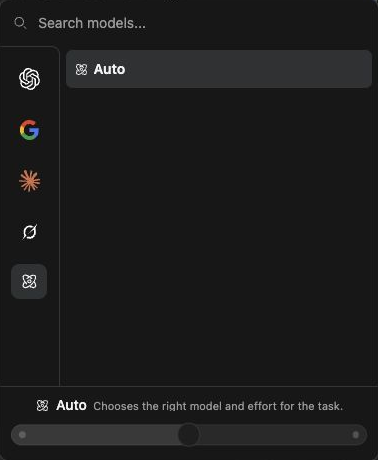
The Reasoning Effort setting controls how much deliberation a supported model uses. More effort can take longer and cost more. Auto manages its configured effort automatically; the menu disables the manual effort control while Auto is selected. A manually selected model may offer different effort choices.

How Auto Behaves as a Thread Continues
Section titled “How Auto Behaves as a Thread Continues”Auto keeps the selected model during a run. A later request can move the thread to a stronger model when the work becomes more demanding. It keeps that stronger choice for continuity rather than switching down for every short follow-up.
Start a new thread for unrelated light work when you want a fresh selection. Stay in the original thread when its earlier context matters. Changing model selection does not rewrite previous answers.
Check Availability and Results
Section titled “Check Availability and Results”The model list depends on your deployment, account access, and available budget. If automatic routing is unavailable or uncertain, Redbelt can use a configured fallback model. Seeing Auto in the menu does not establish that every routing tier has been configured.
Inspect the finished answer and any tool results. If no suitable model is available or a run is interrupted, ask an administrator to check provider setup, model access, and usage limits. Auto cannot supply a missing provider credential.
Related: start a thread, configure an agent, and integrations and providers.