Uploading Files through the API
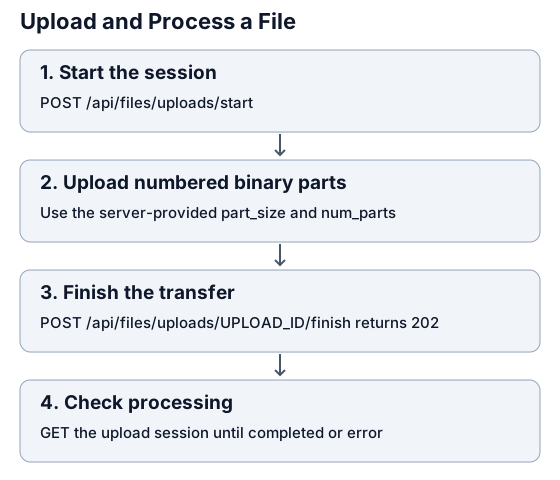
The upload API sends a file in server-sized parts, then queues it for processing. Finishing the transfer and completing processing are separate steps.
Before you start
Section titled “Before you start”You need Python 3.10 or later, an API key, and a writable Knowledge folder. Open that folder in Redbelt: its URL has the form /knowledge/FOLDER_ID. Use that UUID as REDBELT_FOLDER_ID.
The API key’s identity must have write access to the folder. A service account does not automatically inherit the creator’s private folders. Choose a supported file type and a nonempty file no larger than 512 MiB (536,870,912 bytes).
Upload and confirm processing
Section titled “Upload and confirm processing”Set REDBELT_API_KEY as described in the quickstart and set your folder ID:
export REDBELT_FOLDER_ID="YOUR_FOLDER_UUID"Save this as upload_file.py:
"""Upload a file in server-sized parts and wait for its processing result."""

import json
import os
import sys
import time
from pathlib import Path
from urllib.request import Request, urlopen


def upload_file(api_url, api_key, folder_id, file_path, *, timeout=300):
    path = Path(file_path)
    size = path.stat().st_size
    if not 0 < size <= 512 * 1024 * 1024:
        raise ValueError("Choose a nonempty file no larger than 512 MiB.")

    def call(method, route, *, payload=None, body=None):
        headers = {"Authorization": f"Bearer {api_key}"}
        if payload is not None:
            body = json.dumps(payload).encode()
            headers["Content-Type"] = "application/json"
        elif body is not None:
            headers["Content-Type"] = "application/octet-stream"
        request = Request(
            api_url.rstrip("/") + route,
            data=body,
            headers=headers,
            method=method,
        )
        with urlopen(request, timeout=60) as response:
            return json.load(response)

    started = call(
        "POST",
        "/files/uploads/start",
        payload={
            "folder_id": folder_id,
            "file_name": path.name,
            "size": size,
        },
    )
    upload_id = started["upload_id"]
    with path.open("rb") as source:
        for part_number in range(1, started["num_parts"] + 1):
            chunk = source.read(started["part_size"])
            if not chunk:
                raise ValueError(
                    "The file changed or ended before all parts were read."
                )
            received = call(
                "PUT",
                f"/files/uploads/{upload_id}/part/{part_number}",
                body=chunk,
            )
            if received["received_bytes"] != len(chunk):
                raise RuntimeError("The server did not acknowledge the complete part.")
        if source.read(1):
            raise ValueError("The file grew after the upload session started.")

    call("POST", f"/files/uploads/{upload_id}/finish")
    deadline = time.monotonic() + timeout
    while True:
        session = call("GET", f"/files/uploads/{upload_id}")
        if session["status"] == "completed":
            return upload_id
        if session["status"] in {"error", "aborted"}:
            raise RuntimeError(
                f"Upload {upload_id} ended with status {session['status']}."
            )
        if time.monotonic() >= deadline:
            raise TimeoutError(f"Processing is still pending for upload {upload_id}.")
        time.sleep(2)


if __name__ == "__main__":
    result = upload_file(
        os.environ.get("REDBELT_API_URL", "https://redbelt.ai/api"),
        os.environ["REDBELT_API_KEY"],
        os.environ["REDBELT_FOLDER_ID"],
        sys.argv[1],
    )
    print("Completed upload:", result)
Run it with a small document first:
python3 upload_file.py document.pdfThis script reads the file without loading it all into memory. It uses the server’s part size and number of parts, checks each acknowledgment, finishes the upload, and polls for a terminal processing status. It checks a five-minute processing deadline between status requests; a timeout does not cancel the server’s work.
Understand each step
Section titled “Understand each step”| Step | Endpoint | Successful result |
|---|---|---|
| Start | POST /api/files/uploads/start | 201 with upload_id, part_size, num_parts, and file_type_id. |
| Send a part | PUT /api/files/uploads/UPLOAD_ID/part/PART_NUMBER | Acknowledgment with part_number and received_bytes. Part numbers start at 1. |
| Finish | POST /api/files/uploads/UPLOAD_ID/finish | 202, usually with status queued. |
| Check processing | GET /api/files/uploads/UPLOAD_ID | Upload session including status and part counts. |
These responses are JSON objects directly. Binary parts use application/octet-stream; the start request uses application/json.
Session statuses include uploading, queued, processing, completed, error, and aborted. Treat completed as successful processing. Use GET /api/files/UPLOAD_ID for the file’s metadata.
Check the result in Redbelt
Section titled “Check the result in Redbelt”Open the destination Knowledge folder. Find the file, open it, and confirm its content is available. You can then reference its upload_id in an agent thread.
Interrupted or failed uploads
Section titled “Interrupted or failed uploads”- Inspect GET /api/files/uploads/UPLOAD_ID before deciding how to recover an interrupted transfer.
- To discard an incomplete upload, use DELETE /api/files/uploads/UPLOAD_ID. Successful deletion returns 204 with no JSON body. It is allowed for uploading or errored sessions; it cannot cancel every later processing state.
- For a processing error, inspect the file’s status in Knowledge and confirm the format is supported.
- For access errors, check the folder’s permissions for the API key identity.
- Do not blindly repeat the start request: that can create another upload.
For the complete schemas, use the API reference. For the browser interface, see add content to Knowledge.