API Quickstart
Make your first authenticated request to Redbelt by listing the models available to your API key. This guide uses Python’s standard library.
Before you start
Section titled “Before you start”You need a Redbelt account, an organization with API access, and Python 3.10 or later. Creating a key requires permission to edit your organization’s admin settings. Ask your administrator for access if Developer or Create key is unavailable.
Create your key
Section titled “Create your key”- Sign in to Redbelt and open Settings.
- Select Developer under Admin.
- In API keys, click Create key.
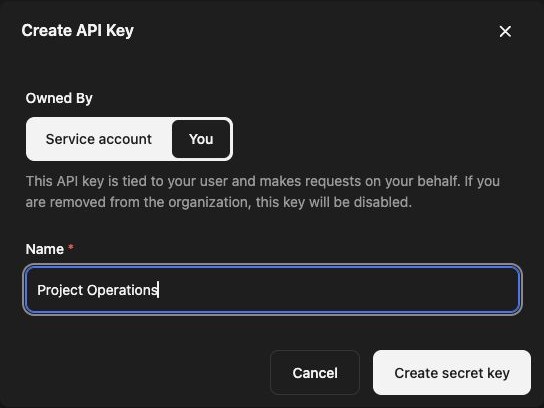
- Choose Service account for an integration identity, or You to make requests as your user. Enter a name you will recognize later.
- For a service account, review Auto share resources with creator. This shares resources created by that key with you; it does not grant the service account access to all your existing private resources.
- Click Create secret key. If prompted, use Sign in again and repeat the creation step.
- In Save your key, click Copy, store it securely, and click Done. The full key is displayed only once.
See Create and manage API keys for ownership and revocation details.
Set your environment
Section titled “Set your environment”Set REDBELT_API_KEY in the environment where Python will run. In a terminal, this reads the value without displaying it or putting it in a literal shell command:
read -rs REDBELT_API_KEYexport REDBELT_API_KEYPaste your key and press Enter. Keep it out of source files and browser code. For a self-hosted deployment, also set REDBELT_API_URL to its API base URL, including the /api path.
List available models
Section titled “List available models”Save this as list_models.py:
"""List models available to the API key identity."""

import json
import os
from urllib.request import Request, urlopen

api_url = os.environ.get("REDBELT_API_URL", "https://redbelt.ai/api").rstrip("/")
request = Request(
    f"{api_url}/v1/models",
    headers={"Authorization": f"Bearer {os.environ['REDBELT_API_KEY']}"},
)
with urlopen(request, timeout=30) as response:
    models = json.load(response)
print(json.dumps(models, indent=2))
Run it:
python3 list_models.pyA successful request returns HTTP 200 and a JSON array. The entries depend on your organization’s configured providers and your access. An empty array is a valid response; it does not prove a model provider is configured.
If the request fails
Section titled “If the request fails”- 401: check that the key is present, belongs to this deployment, and has not been revoked.
- 403: confirm the API key identity has the required organization access.
- A connection or hostname error: check the API base URL and your network.
- Missing models: ask your administrator to review model/provider configuration.
Next, make a direct AI request, run an agent, or run a workflow.