Manage Roles and Permissions
Roles group permissions for organization work. Resource sharing additionally controls access to particular files, folders, agents, and workflows.
Roles Set the Kind of Access
Section titled “Roles Set the Kind of Access”A role describes what a member can do at the organization level. Sharing determines which particular resources they can use. A reviewer may need read access to a launch folder without permission to manage billing, providers, or membership.
Review the individual permissions rather than choosing a role only by its name. After a change, check the member’s effective role and the resource’s sharing. Protected roles can have restrictions that preserve administration; those controls are part of the supported access model.
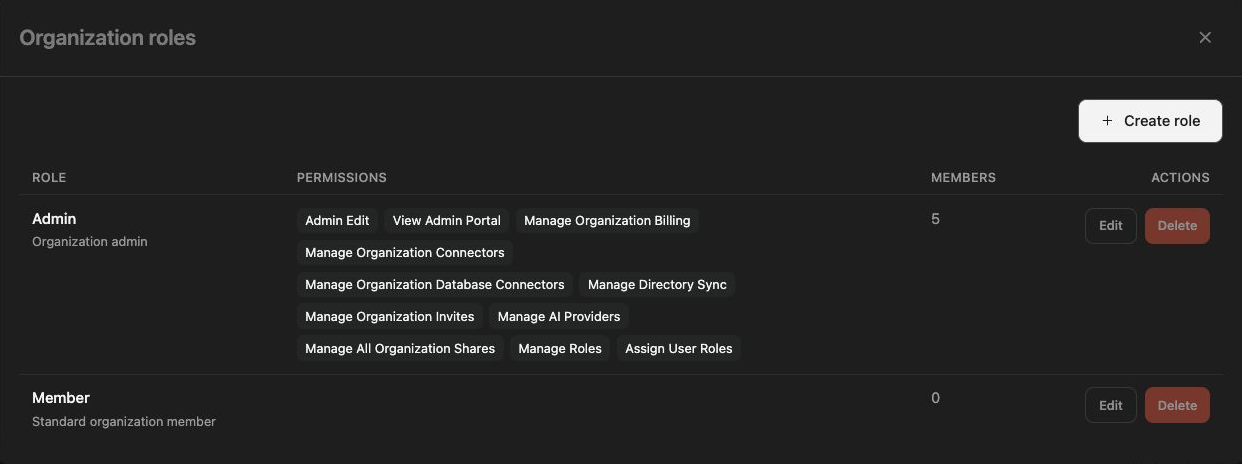
Review role definitions
Section titled “Review role definitions”- Open Settings → Members in the intended workspace.
- Click Manage roles to open Organization roles.
- Inspect the roles and permissions offered by the current deployment.
- If you can edit a role, change only the permissions required for its purpose.
- Save and reopen the role to verify the definition.
System or protected roles can have editing restrictions. A historical roles URL may redirect to the current Members view instead of a standalone roles page.
Assign a role
Section titled “Assign a role”Open the member’s settings, choose the intended role, and save the change. Confirm the member’s resulting role in the list. For a launch reviewer, ordinary resource read access may be sufficient; administrator privileges are a separate decision.
Check effective access
Section titled “Check effective access”Review both the role and the resource’s sharing. Hiding a button is not an access policy, and a resource link does not grant permission. Changes can affect future actions without undoing actions already completed.
If role controls are unavailable, ask an authorized organization administrator. Avoid removing the last effective administrator while reorganizing permissions. Use the deployment’s protected-role rules rather than attempting to work around them.