SMS Enrollment and Consent
Redbelt AI LLC’s optional SMS program sends reminders, workflow updates, and internal alerts that users request through Redbelt. Messages may contain AI-generated content and links to Redbelt task threads. This program does not include promotional texts or two-way AI messaging.
Where Users Enroll
Section titled “Where Users Enroll”Enrollment takes place after signing in to Redbelt, on the Twilio plugin page, in Receive Texts on My Phone. Users do not need their own Twilio account. Redbelt provides the sending number.
To enroll:
- Review Redbelt’s sending number and enter your own US mobile number.
- Read the SMS disclosure, SMS Terms, and Privacy Policy.
- Select the optional consent checkbox. It is unchecked by default.
- Choose Enroll My Phone to save your consent.
Creating an account, accepting general service terms, or installing the Twilio plugin does not enroll a user in SMS. Consent is optional and is not a condition of purchase or use of Redbelt. Changing the recipient number clears the checkbox so the user must review and consent again.
SMS Enrollment Form
Section titled “SMS Enrollment Form”The form identifies Redbelt AI LLC and its sending number, +1 504 389 3140. The SMS checkbox is unchecked by default. Enroll My Phone becomes available only after the user enters a number in the required US format and selects the checkbox.
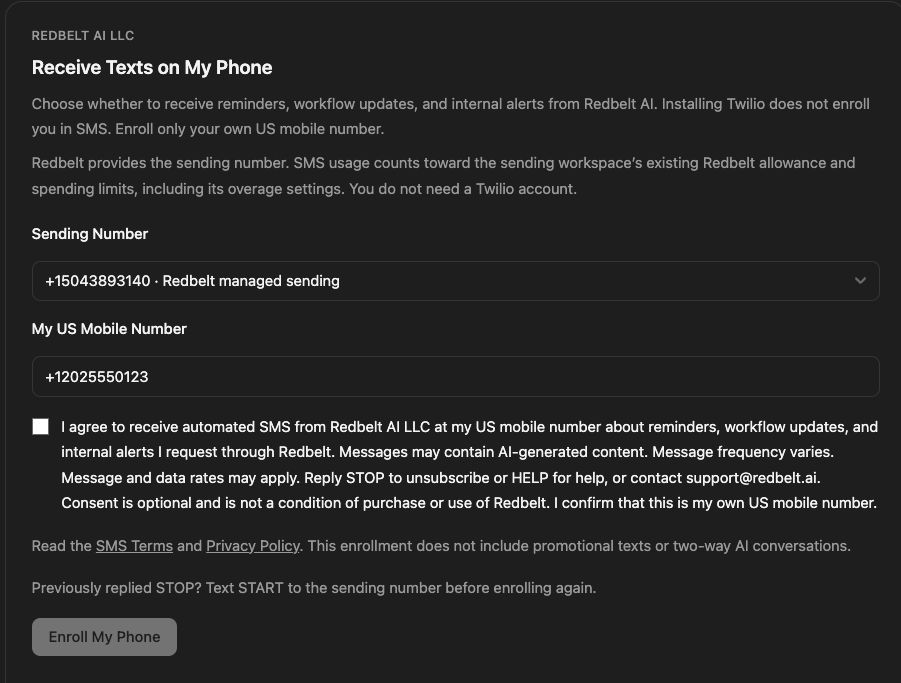
Consent Disclosure
Section titled “Consent Disclosure”The form displays the following disclosure beside the checkbox:
I agree to receive automated SMS from Redbelt AI LLC at my US mobile number about reminders, workflow updates, and internal alerts I request through Redbelt. Messages may contain AI-generated content. Message frequency varies. Message and data rates may apply. Reply STOP to unsubscribe or HELP for help, or contact [email protected]. Consent is optional and is not a condition of purchase or use of Redbelt. I confirm that this is my own US mobile number.
Enrollment Confirmation
Section titled “Enrollment Confirmation”After selecting Enroll My Phone, the user sees confirmation that their SMS consent has been saved, and the number appears in their list of enrolled numbers. Redbelt then texts the number this confirmation:
Redbelt: You’re enrolled for the reminders and alerts you request. Msg frequency varies. Msg & data rates may apply. Reply HELP for help, STOP to opt out.
Later messages begin with “Redbelt:” so the sender is always clear. Saving consent does not itself authorize sending before the number’s messaging registration is approved and enabled.

Screenshots use the fictional recipient number +1 202 555 0123. No personal recipient number is shown.
Unsubscribe and Get Help
Section titled “Unsubscribe and Get Help”Reply STOP to unsubscribe, or select the remove (trash) button beside the number in the Twilio plugin. Reply HELP for help or contact [email protected].
Removing a number saves the withdrawal, displays a confirmation, and takes the number off the list. It gets no further texts unless the user enrolls it again.
After replying STOP, texting START removes the carrier block; users must then enroll again in the plugin. START alone does not enroll users in recurring Redbelt messages. Initial enrollment is through the plugin form, not a text keyword.
Privacy and Usage
Section titled “Privacy and Usage”Mobile information and SMS opt-in consent are not sold or shared with third parties for their marketing or promotional purposes. Service providers may process information as needed to operate the SMS program. See the Privacy Policy for details.
Message frequency varies with the reminders, workflows, and alerts users request. Message and data rates may apply. SMS usage counts toward the sending workspace’s existing Redbelt allowance and spending limits, including its overage settings.