Create and Configure an Agent
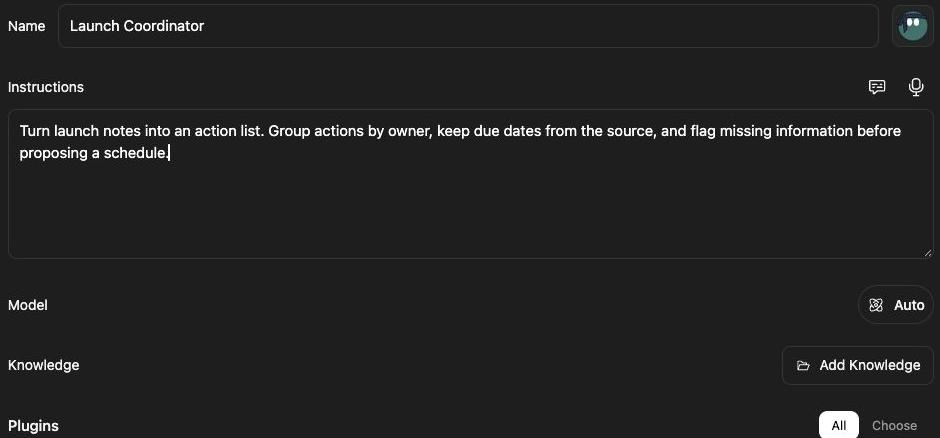
An agent packages the instructions and capabilities for a repeated task. For example, Launch Coordinator can summarize plans into owners, deadlines, and open questions.
Why Save an Agent?
Section titled “Why Save an Agent?”An agent saves the instructions and resources for a recurring role. A Launch Coordinator can consistently produce an owner-and-deadline checklist without your retyping those requirements each week. A saved prompt supplies reusable message text; an agent additionally has model, Knowledge, and plugin configuration.
Write instructions about the outcome, source handling, and missing information. “Preserve dates and flag missing owners” is more useful than “be helpful.” Choose only the plugins the role needs and attach relevant Knowledge. Selecting Auto lets the workspace choose an appropriate model for the agent’s task.
Before you start
Section titled “Before you start”You need permission to create or edit the agent and access to its Knowledge. Model and plugin availability depend on workspace configuration.
Configure an agent
Section titled “Configure an agent”- Open the agent library and choose Create Agent → Start from scratch.
- Give the agent a useful name.
- Write its Instructions, including the task, desired format, and limits.
- Select its Model and any supported effort setting.
- Use Add Knowledge or Edit Knowledge to choose relevant files or folders.
- Select only the plugins needed for its work and connect required accounts.
- Wait for the saved state, then test the agent in a thread.
Example instructions:
Read the launch plan. Return a table of owner, action, and due date. List open questions separately. Ask before sending updates to other apps.
AI generation can help draft a configuration where Generate Agent is available. Inspect generated instructions and capabilities before using them.
Check the result
Section titled “Check the result”Ask the agent for a short launch summary and compare it with the source file. Saved configuration does not prove that every provider connection works. If a system agent is read-only, use the offered duplication path to make an editable copy instead of changing the shared original.
Related: Knowledge context, plugin workflow actions, and action approvals.