Use Workflow Inputs and Variables
Inputs supply values when a workflow starts. References reuse values from earlier steps instead of copying fixed text into every action.
Fixed Values and References
Section titled “Fixed Values and References”A fixed value stays the same in later runs: for example, a document name prefix. A run input changes each time: this week’s notes. A reference takes a value from another step: the checklist text an agent just produced.
Match the value to the receiving field. A number supports numerical comparison; a list lets a loop handle separate items; a Knowledge selection identifies a resource. A file reference is not the same thing as its text. Use the editor’s value controls and inspect the upstream output before binding it to a later app action.
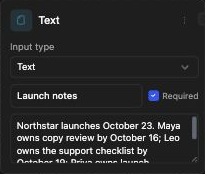
Define useful inputs
Section titled “Define useful inputs”- Add an Input step or edit the workflow’s input configuration.
- Give each field a descriptive name and label.
- Choose its type, such as Text, Number, List, or Knowledge from the current input-type menu.
- Decide whether it is required and provide a default only when appropriate.
- Open the run form and check the rendered control and validation.
For a launch review, use Text for notes and a Knowledge input for a selected resource. Include dates in the notes or the offered field configuration. A field named “amount” should use a numeric type when a later branch compares it with a threshold.
Reuse a result
Section titled “Reuse a result”Use the editor’s available reference or value controls to bind a later field to an earlier step output. Inspect the selected field’s structure: a list, a file reference, and a plain string are different values. Use Convert or an agent transformation when the next action needs a different format.
Do not hard-code private resource IDs or credentials into reusable text fields. Choose authorized resources and connected accounts through their controls.
Troubleshoot missing values
Section titled “Troubleshoot missing values”Check required run inputs, the upstream step’s success, and whether the branch containing that step ran. After renaming steps, inspect dependent references. Do not invent template syntax; use the syntax and reference controls accepted by the selected field.