Save and Reuse Prompts
A saved prompt is reusable text. An agent additionally carries configuration such as a model, Knowledge, and plugins. Choose a prompt when you mainly want to reuse a well-written request.
Reuse Instructions, Keep the Source Current
Section titled “Reuse Instructions, Keep the Source Current”A saved prompt is reusable request text. It is useful for a weekly update whose structure should stay the same even though the underlying notes change. It does not by itself store a new week’s files or prove that the agent has read them.
Save the repeatable part—progress, decisions, next actions—and attach the current source when you use it. Use an agent when you also want persistent role instructions and resources; use a workflow when the task needs a fixed sequence of steps.
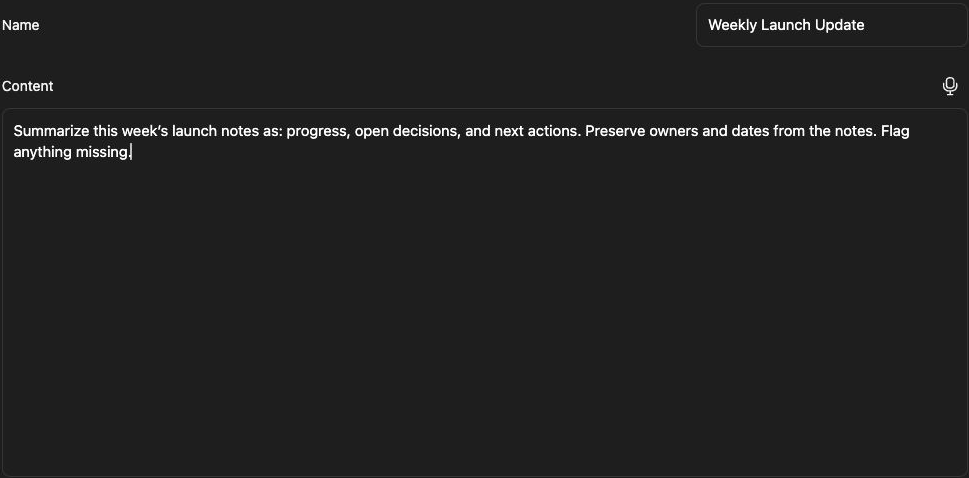
Create a prompt
Section titled “Create a prompt”- Open the prompt library and choose Create Prompt.
- Enter a name such as Weekly Launch Update.
- Write the prompt content with a clear task and desired output.
- Save the prompt and reopen it to confirm its text.
Example:
Summarize the launch plan into completed work, next actions, owners, and deadlines. Flag missing information rather than inventing it.
Where available, Generate Prompt or Update Prompt helps draft wording. Review the result before using it. The Save this prompt? dialog also lets you save prompt text with a title.
Reuse or share it
Section titled “Reuse or share it”Select the saved prompt through the composer’s prompt picker or open it in the library, then supply the current context and request. Update project-specific names or dates before sending. The prompt does not automatically grant access to files mentioned in its text.
Use Save to Folder when you want a Markdown copy in Knowledge. Check the destination and sharing permissions of that copy. Editing a copied file and editing the saved library prompt are separate operations.
Related: configure an agent and start a thread.