Review Actions and Answer Follow-up Questions
A run can pause for missing information or for permission to perform an action. Answering a question and approving an external change serve different purposes.
Approve the Specific Action
Section titled “Approve the Specific Action”An approval is a checkpoint for an action, such as sending a message or changing a resource. A follow-up question asks you for missing information. Supplying an email address answers a question; it does not mean you should skip reviewing the final recipient and message when an approval appears.
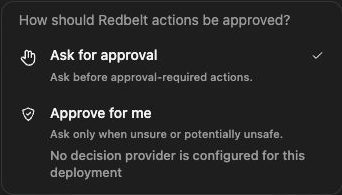
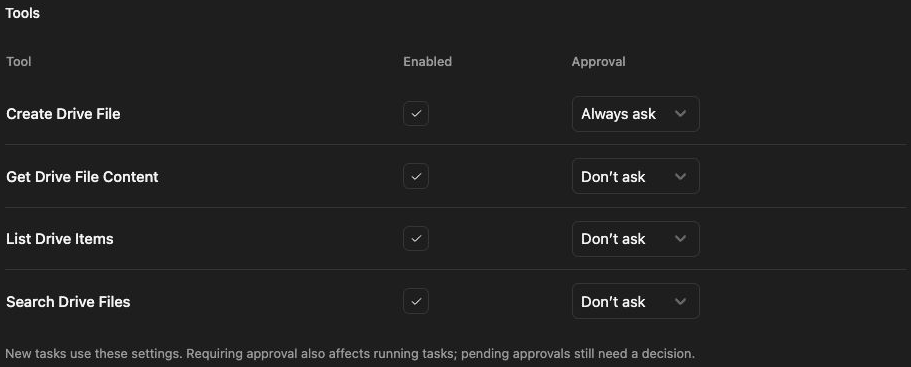
The composer offers Ask for approval and, when configured, Approve for me. Automatic review depends on a configured decision provider and your workspace’s policy. A disabled option explains what is missing. Review the proposed action’s destination, inputs, and effect before choosing its offered response.
Review a proposed action
Section titled “Review a proposed action”- Open the pending action card or tray.
- Read the action’s target, account, recipient, and arguments.
- Check the proposed content or change against your request.
- Use the offered action decision controls to approve or reject the exact action.
- Follow the result after the run continues.
For a launch update, verify the intended chat space and message before approving the send. If a warning requires explicit confirmation, review the arguments before selecting its confirmation checkbox.
Choose an approval mode
Section titled “Choose an approval mode”Where available, Ask for approval keeps decisions with you. Approve for me uses automatic review according to the configured policy. Automatic review can still require attention or refuse an action. A mode selection does not bypass workspace permissions or the connected provider’s permissions.
Answer a follow-up question
Section titled “Answer a follow-up question”Supply the missing information in the question’s response control or the thread composer. Be specific: provide the exact folder name or link rather than “Use the usual one.” Check that the run resumes and finishes afterward.
If an action started but its result was not confirmed, inspect the destination before retrying it. Approving the action is not proof that it completed.
Related: tool activity and workflow results.