Find Your Way Around Redbelt
Redbelt brings threads, files, and repeatable workflows into one workspace. Start with the navigation on the left.
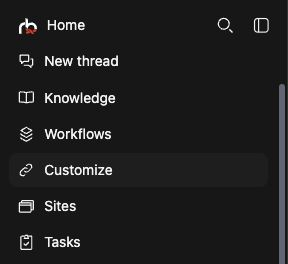
Pick a Starting Point
Section titled “Pick a Starting Point”Use a thread for an open-ended task you want to refine through follow-ups. Use a workflow when you want to repeat a defined sequence with new inputs. Use Knowledge to inspect and organize the source material both can use.
Plugins give the agent actions in an app, such as reading a spreadsheet or creating a document. Connectors bring selected source content into Knowledge for later use. You might use both for Drive: sync reference files with a connector, then create a new checklist with the plugin.
Choose where to work
Section titled “Choose where to work”| Navigation item | Use it to |
|---|---|
| New thread | Start a thread with an agent. |
| Knowledge | Browse folders, add content, and open files. |
| Workflows | Find and run repeatable workflows. |
| Customize | Manage plugins, connectors, and other customization options. |
| Sites | Work with websites available in your workspace. |
| Tasks | Review tasks and their progress. |
Your available pages and controls depend on your permissions and workspace configuration. An administrator may need to configure providers before an app can be connected.
Open settings
Section titled “Open settings”Open Settings from the account area of the navigation. Personal sections control your preferences. Workspace and Admin sections contain team and organization settings when you have permission to use them.
Developer, under Admin, contains API keys and an API documentation link.
Work with multiple panes
Section titled “Work with multiple panes”If your account has Advanced features enabled, Redbelt can show several panes and tabs in one workspace. Select the pane you want to work in before typing or changing its contents. A narrow pane may put some controls in a menu.
You can collapse the navigation to give the current content more room.
Try a first task
Section titled “Try a first task”Start a thread to ask a question, or add content to Knowledge to make a document available for later work.
If a page or action is unavailable, check that you selected the intended organization and ask your administrator about access.